Search Module
Overview
The Search Module is a crucial component of a health management system that allows users to efficiently retrieve and track data across multiple sections, including the Zero Dose Registry, Child Health, and Woman Health. Each of these sections has its specific parameters, but there are also some common search parameters for consistency and ease of use. This ensures healthcare workers, managers, and other system users can quickly locate relevant information across various patient groups.
Main Sections of the Search Module
- Zero Dose Registry
- Child
- Woman
Each section provides a unique set of parameters tailored to the specific needs of that group, but there are shared features to maintain uniformity in the system's operations.
Common Search Parameters Across All Sections
The common search parameters are shared across the Zero Dose Registry, Child Health, and Woman Health sections. These parameters ensure that users can filter and retrieve the most relevant records based on general demographic and contact details. Here are the common parameters:
ID: A unique identifier assigned to each individual (can be a system-generated ID, CNIC, or other identifier).
Name: The name of the individual (either child or woman) for identification purposes.
Date of Birth: This helps filter records by age, useful for searching within specific age ranges (e.g., children under 5 years old, or women of reproductive age).
Location:
District: The district where the individual resides.
Town: The town or city within the district.
UC (Union Council): The smallest administrative unit or local council within a district. Contact Information:
Phone Number: For follow-up or communication with the patient. CNIC (or National ID): The National Identification Number or CNIC (Computerized National Identity Card) number, used for official records and identification.
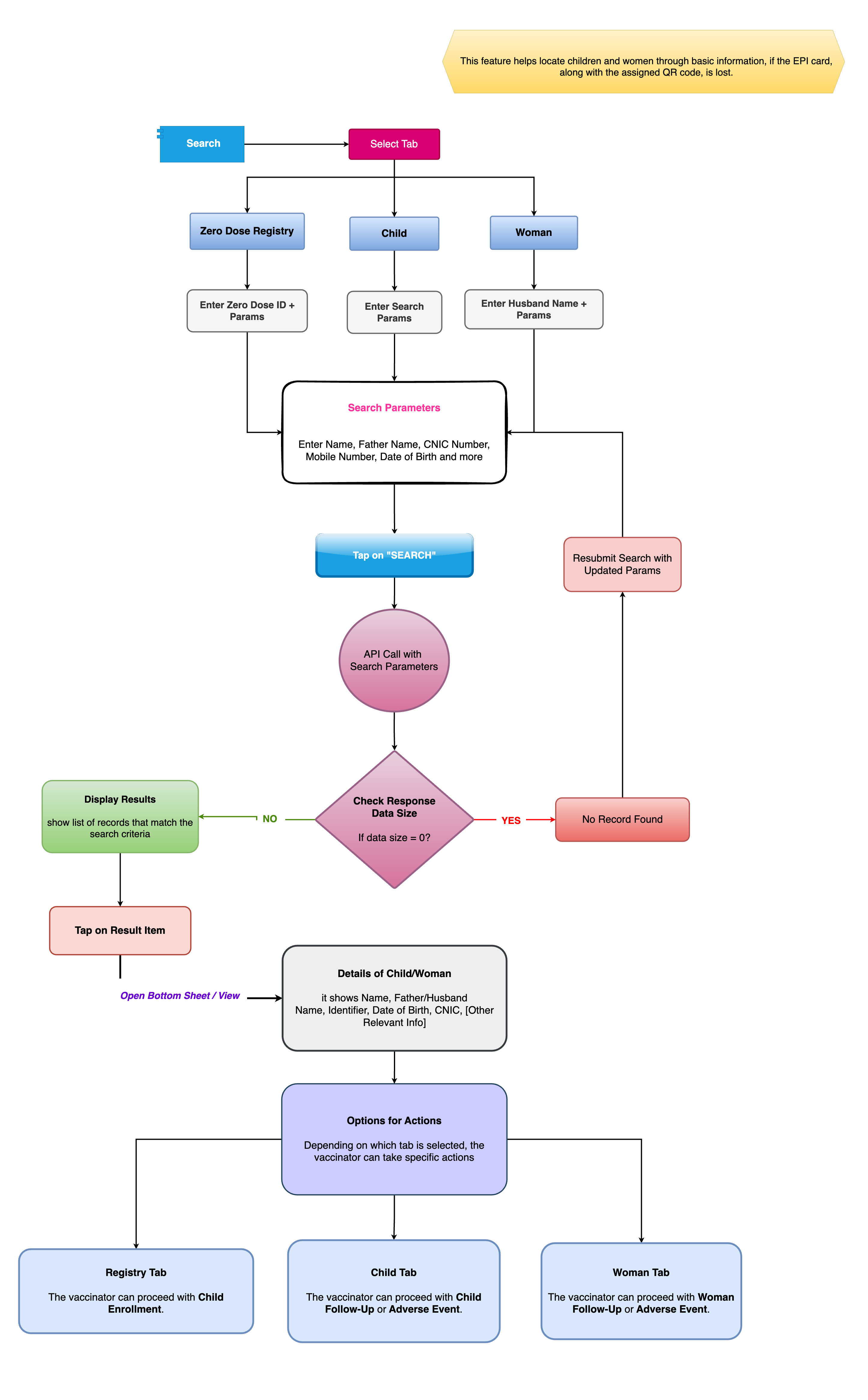
User Journey for Search Process
1. User Inputs Search Parameters: The user enters search parameters in the unified search interface. For example: ID: “12345” Name: “John Doe” Date of Birth: “01/01/2020” Location: “District A, Town B, UC 123” Contact: “1234567890” CNIC: “12345-6789012-3”
2. API Call to Fetch Results: The system sends a request to the Search API with the parameters provided. The API filters the data based on the criteria and returns matching results.
3. Result Size Check: If the search results have size > 0, the system will display the records in the bottom sheet/modal. If the size is 0, it will show the message "No records found".
4. Displaying Search Results: The system displays a list of matching records. Each record includes:
- Name
- ID
- Date of Birth
- Location
- Contact Information
From this list, the user can select a record and choose the next action.
5. Redirection Based on Module Type:
1: Zero Dose Registry: The user is redirected to Child Enrollment to provide the necessary vaccinations.
2: Child: The user can be redirected to:
-
Adverse Event (if there’s a report of a vaccine-related issue)
-
Child Follow-Up (for scheduled follow-up visits or care).
3: Woman: The user can be redirected to:
-
Adverse Event (for any pregnancy-related complications or side effects)
-
Woman Follow-Up (for postnatal check-ups or other health follow-ups).
1. Zero Dose Registry (ZDR) Overview
A Zero Dose Registry is a system designed to track children who have not received any immunizations. This registry helps to identify and follow up with children who are at risk of vaccine-preventable diseases due to missing or delayed vaccinations.
Key Features
- Child Identification: Tracks children who have not received any doses of vaccines such as BCG, OPV, DTP, Hepatitis B, etc.
- Vaccine History Tracking: Maintains historical data on vaccinations to prevent over-vaccination and ensure proper coverage.
- Follow-up Alerts: Automatic notifications and alerts for healthcare workers to follow up with parents/guardians and ensure children receive the necessary doses.
- Integration with National Immunization Programs: Often integrated with local/national immunization programs to maintain accurate national coverage data.
Zero Dose Registry Process Flow
- Step 1: Registration of Newborns – Newborns are registered in the healthcare system at birth, either through birth records or hospital registrations.
- Step 2: Tracking Immunization Status – Vaccination status is checked at subsequent health visits.
- Step 3: Zero Dose Identification – If the child has not received any vaccine doses, they are flagged in the registry.
- Step 4: Follow-up & Reminders – Healthcare workers receive automated reminders and schedules for outreach to parents/guardians.
- Step 5: Revisit and Immunization – Children are revisited for immunizations; the registry is updated accordingly.
2. Child Module Overview
This module aims to ensure that children receive the necessary immunizations and healthcare services throughout their early years, from birth to adolescence.
Key Features
- Health Screening: Regular screening for conditions like malnutrition, anemia, etc.
- Immunization Management: Tracks vaccines administered, next due dates, and missed vaccinations.
- Growth and Development Monitoring: Tracks milestones like height, weight, and developmental stages.
- Preventive Care: Ensures that health check-ups for early childhood diseases, such as pneumonia, diarrhea, etc., are carried out.
- Referral System: Refers high-risk children to specialized services like pediatric care or nutrition counseling.
Child Process Flow
- Step 1: Birth Registration & Initial Health Check – The child is registered, and the initial health check-up is done in the hospital or clinic.
- Step 2: Regular Health and Growth Monitoring – Growth monitoring and health screenings happen at scheduled intervals (e.g., monthly, quarterly).
- Step 3: Immunization Scheduling – A record of scheduled vaccinations is kept, with automatic reminders for healthcare workers.
- Step 4: Health Interventions – If any issues (like malnutrition or underdeveloped milestones) are detected, interventions such as nutritional support or specialized care are provided.
- Step 5: Continued Health Check-ups – Continue regular monitoring until the child reaches a certain age or developmental milestone (e.g., age 5).
3. Woman Module Overview
This module focuses on the healthcare of women, especially around reproductive health, maternal care, and preventive health measures.
Key Features
- Antenatal Care (ANC) Tracking: Monitoring the health of a woman during pregnancy, ensuring regular checkups and proper care.
- Immunization During Pregnancy: Ensures that pregnant women receive vaccines like Tetanus, influenza, and others as recommended.
- Postnatal Care (PNC): Follow-up care for women after childbirth, including family planning, postpartum depression screening, and other health checks.
- Family Planning: Tracks contraception use and provides family planning counseling.
- Cervical and Breast Cancer Screening: Monitors regular screening for cervical cancer (e.g., Pap smear) and breast cancer (e.g., mammography).
Woman Process Flow
- Step 1: Registration and Initial Health Check – At the time of pregnancy registration, the woman’s initial health and pregnancy status are recorded.
- Step 2: Antenatal Care Monitoring – Regular visits for blood pressure checks, ultrasounds, blood tests, and vaccine administration.
- Step 3: Delivery Preparation – Preparation for delivery, including planning for hospital-based delivery or home delivery.
- Step 4: Postnatal Care – After childbirth, the woman is monitored for recovery, breastfeeding support, and family planning options.
- Step 5: Routine Health Monitoring – Regular follow-ups for general health, immunization, and cancer screenings (e.g., Pap smear, mammograms).
Flowchart