Child Modules
Overview
The Child Modules in the Zindagi Mehfooz Application are designed to streamline the process of enrolling children, tracking their vaccination progress, and maintaining a registry. These modules help health workers efficiently manage and track children’s health data from the point of enrollment to subsequent follow-ups.
Modules
- Child Registry
- Child Enrollment
- Child Follow-up
Each module includes the process flow and is supported by a corresponding diagram to visually represent the workflows.
1. Child Registry
Objective
The Child Registry Module in the ZM App is designed to record and manage the details of children who have not received any vaccinations. This module ensures that valid reasons for non-vaccination are documented and enables follow-ups for future immunization efforts.
Process Overview
The Child Registry Form is used when a child does not receive any vaccine due to one or more reasons, such as:
- Illness – The child was unwell and could not receive the vaccine.
- Parental Refusal – Parents declined to vaccinate the child.
- Unavailability of Child – The child was not present at the time of vaccination.
This module validates the collected data, uploads it to the system, and ensures it is available for future monitoring.
Process Flow Description
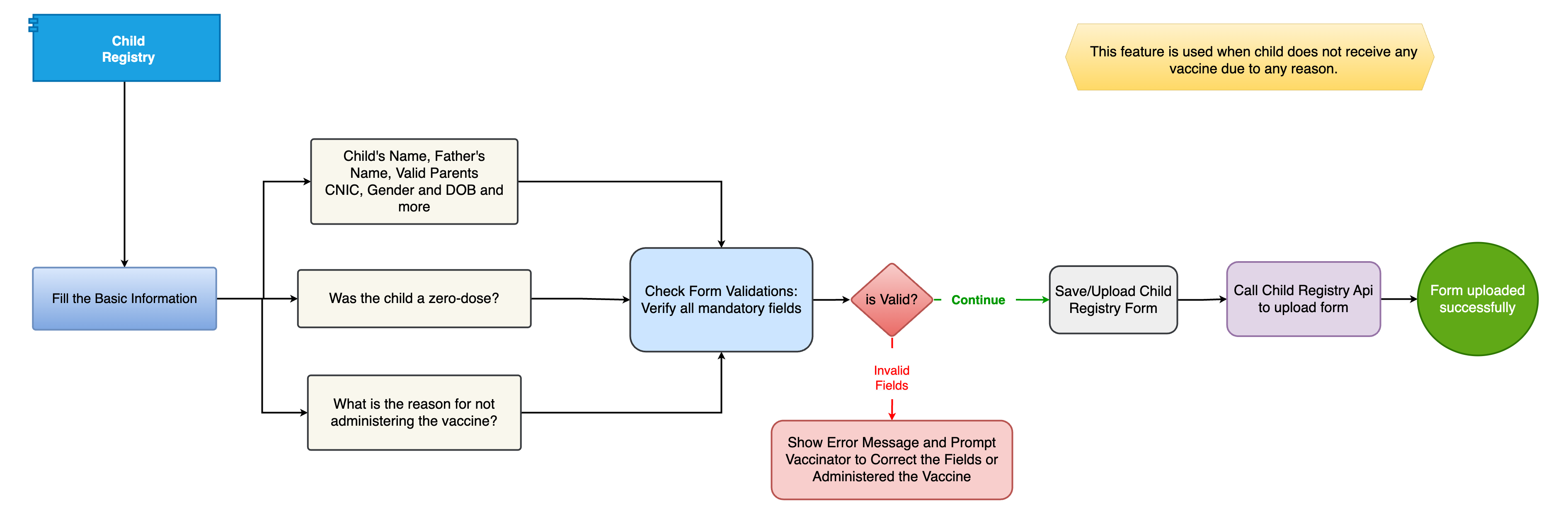
Step 1: Start the Child Registry Process The vaccinator initiates the Child Registry Module when a child has not received a vaccine.
Step 2: Fill Basic Information The vaccinator enters child details, including: Child’s Name Father’s Name Parent’s CNIC (National ID) Gender Date of Birth (DOB)
Step 3: Check Zero-Dose Status The system prompts: "Was the child a zero-dose?" If Yes, proceed to the next step.
Step 4: Identify the Reason for Non-Vaccination The vaccinator selects the reason for missing vaccination, such as: Illness Parental refusal Unavailability of the child
Step 5: Validate the Form The system checks mandatory fields to ensure completeness. If fields are missing or incorrect, the system flags an error.
Step 6: Error Handling (If Needed) If invalid fields are detected: An error message appears, prompting corrections. The vaccinator updates details or administers the vaccine if possible.
Step 7: Save & Upload the Form Once validated, the form is saved and uploaded to the system.
Step 8: Call Child Registry API for Submission The system calls the Child Registry API to securely store the data.
Step 9: Confirmation of Successful Upload If the API processes the form successfully: A success message is displayed. The child's data is stored for future reference and follow-ups.
Key Components
1. Data Collection Captures child’s personal details for record-keeping.
2. Zero-Dose Check Confirms whether the child has received any vaccinations.
3. Reason for Non-Vaccination Requires input on why the child was not vaccinated.
4. Form Validation Ensures all mandatory fields are completed.
5. Error Handling & Correction Displays error messages if required fields are missing.
6. Form Submission & API Call Saves and uploads the form securely.
7. Confirmation & Follow-Up Confirms successful upload, allowing future immunization tracking.
Flowchart
2. Child Enrollment
Objective
The Child Enrollment module is used to register new children into the system. It captures essential demographic details such as the child's name, gender, date of birth, contact information, and the vaccination history.
Process Overview
When a child is enrolled, the following steps are involved:
- Capture Child's Information: The health worker inputs the child's personal information.
- Verify the Information: After entering the information, the system cross-checks if any existing record exists for that child to avoid duplication.
- Assign Vaccine Schedule: Based on the child's age, the system suggests a vaccination schedule.
- Save Enrollment Details: After successful entry, the child is enrolled, and a unique Child ID is generated for the child.
Process Flow Description
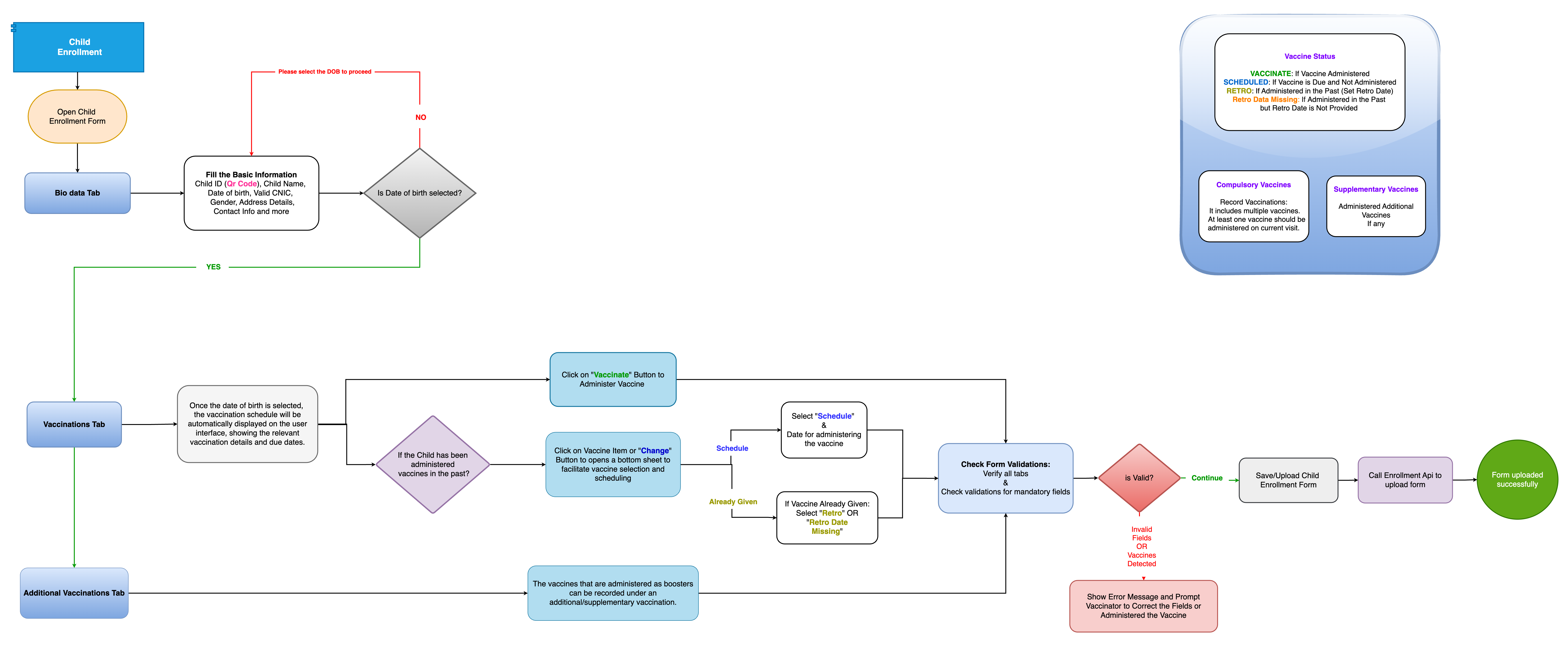
- Step 1: The user selects the Child Enrollment option.
- Step 2: The user enters the child’s basic details such as Name, Gender, Date of Birth, Address, and Contact Information.
- Step 3: The system checks if the child already exists in the database (if yes, the system will prevent duplicate entries).
- Step 4: Based on the child’s age, a vaccination schedule is recommended, which can be customized.
- Step 5: The enrollment data is saved, and a unique Child ID is generated.
Key Components
- Child Information Form (Basic details)
- Duplicate Check (Existing records)
- Vaccination Schedule Assignment
- Child ID Generation
Flowchart
3. Child Follow-up
Objective
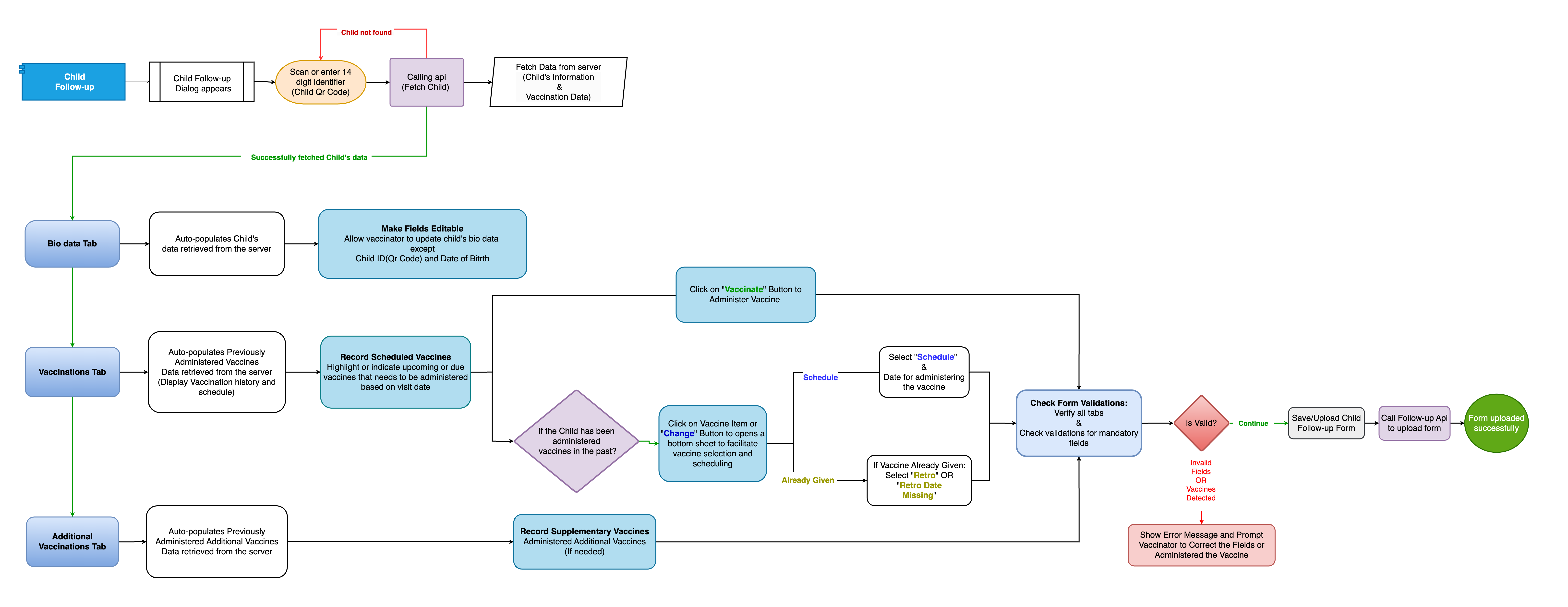
The Child Follow-up module is used to track children’s progress after the initial enrollment. It involves monitoring the completion of vaccinations, recording adverse events, and ensuring that children are up to date with their immunization schedule.
Process Overview
In the follow-up module, health workers can check if the child has received the necessary vaccinations, schedule follow-up appointments, and update vaccination records.
Process Flow Description
- Step 1: The user searches for a Child ID using the search function.
- Step 2: The system retrieves the child’s previous vaccination records.
- Step 3: The health worker records the latest vaccinations and any adverse events.
- Step 4: The system checks if the child is up to date with the vaccination schedule. If there are missing doses, follow-up reminders are generated.
- Step 5: The follow-up date is set for the next visit.
Key Components
- Child ID Search (To find the child)
- Vaccination Tracking (Recording doses and adverse events)
- Adverse Event Logging
- Follow-up Scheduling
Flowchart