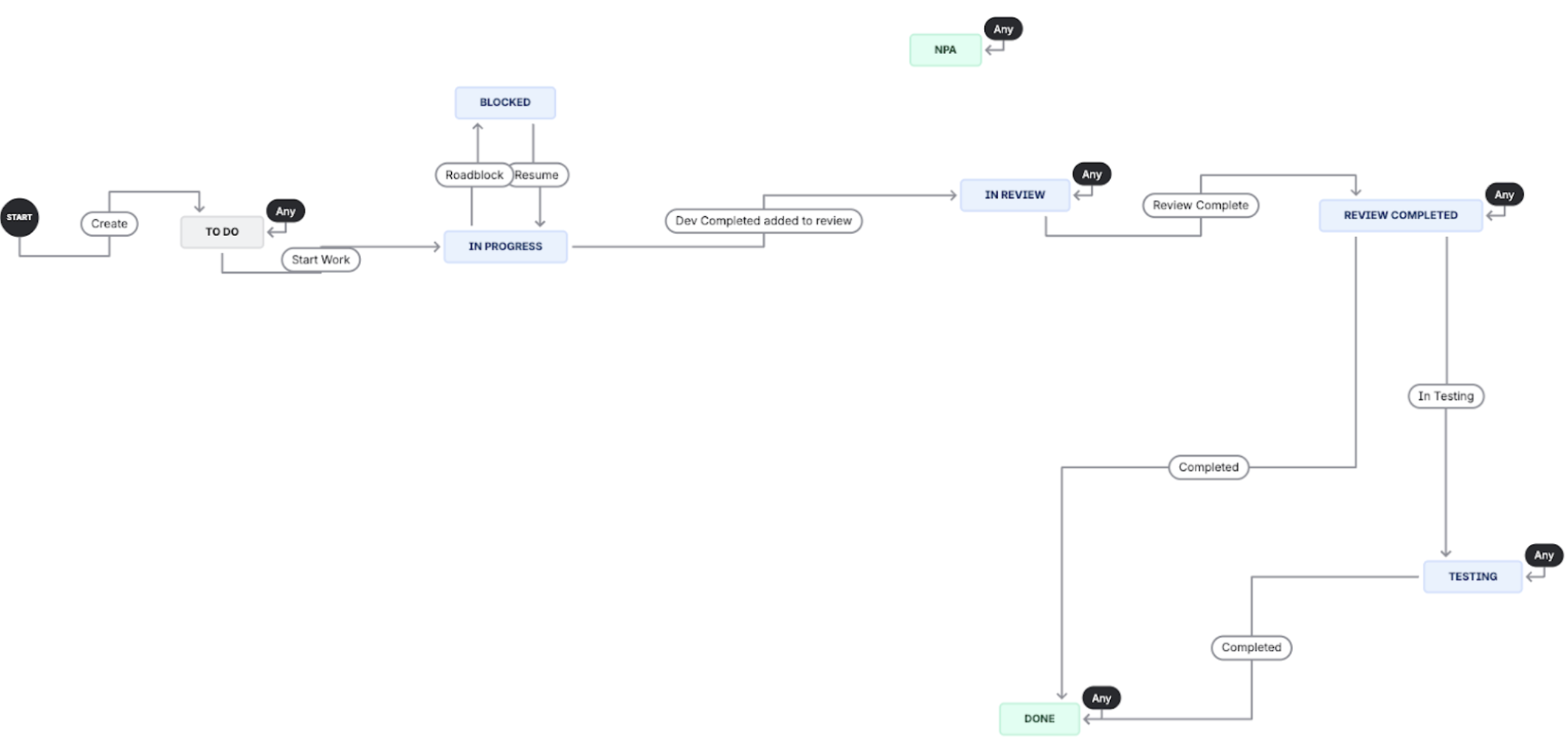
Jira Workflow
This workflow represents our team’s process for managing tasks and issues (Bugs, Stories, Tasks) in a software development project.
Workflow Statuses and Explanations
| Status | Description |
|---|---|
| Open | The initial state for a new issue. The work has been identified but not yet prioritized or assigned. |
| In Progress | The work is actively being done by the assigned team member. |
| In Review | The work is complete and awaiting peer review, testing, or feedback. |
| To Do | The work has been accepted and prioritized, ready to be picked up by a team member. |
| Done | The work is complete, accepted, and closed. |
| Blocked | The work is halted due to an external dependency or an unforeseen obstacle. |
| NPA (No Planned to Address) | The work is not needed to be worked on anymore. |
Status Transitions (Next Options)
| Current Status | Next Available Statuses (Transitions) | Rationale |
|---|---|---|
| Open | To Do, Blocked, Done, NPA | An issue can be prioritized (To Do), immediately blocked if dependencies are known, or occasionally marked Done if it's a quick fix or duplicate. |
| To Do | In Progress, Blocked, NPA | The assigned person begins working on the issue (In Progress), encounters an obstacle (Blocked) or "won't fix" (NPA) based on product strategy. |
| In Progress | In Review, Blocked, NPA | The developer finishes the work and moves it to inspection (In Review), gets stuck (Blocked) or "won't fix" (NPA) based on product strategy. |
| In Review | Done, In Progress, Blocked, NPA | The reviewer either approves the work (Done), sends it back for corrections (In Progress) or identifies a critical block (Blocked) or "won't fix" (NPA) based on product strategy. |
| Done | Open, NPA | Allows for reopening the issue if regression or post-implementation issues are found or "won't fix" (NPA) based on product strategy |
| Blocked | To Do, In Progress, NPA | Once the obstacle is resolved, the issue can return to the queue (To Do), be immediately worked on (In Progress) or "won't fix" (NPA) based on product strategy. |
Types of Issues
We categorize the work tracked in our system into three primary types: Stories, Spikes, and Bugs.
| Issue Type | Description |
|---|---|
| Stories | Capture work that delivers measurable user value. These are typically feature implementations, enhancements, or necessary refactors directly tied to product development. |
| Spikes | Dedicated to research, investigation, design prototyping, or exploration of a technical risk. The output is knowledge or a decision, not shippable product code. |
| Bugs | Represent a defect in the system that causes it to deviate from its expected behavior or requirements. Bugs must be reproducible and fix a current malfunction. |
Types of Stories
Stories are further categorized by the domain or component they affect to facilitate assignment and tracking.
| Category | Description |
|---|---|
| Backend | Stories focused on server-side logic, API development, database changes, performance optimization, and infrastructure work (e.g., service architecture updates). |
| Mobile | Stories focused on development for mobile applications, including UI/UX implementation, device-specific feature integration, and native performance enhancements Including implementation of visual designs, interactive elements, and API integration. |
| QA | Stories focused on quality assurance, including developing test plans, exploratory testing, and managing bug reports. |
| Infrastructure/DevOps | Stories related to continuous integration/continuous deployment (CI/CD), logging, monitoring, security improvements, and environment setup. |
Bug Management Workflow Process
The process follows a clear path to ensure bugs are accurately identified, fixed, tested, and closed.
Process Explanation by Status
| Status | Bug Management Action and Responsibility |
|---|---|
| Open | Identification & Triage (Product Owner/Triage Team): A new defect is reported (manually or automatically). The team confirms it is a valid bug, assigns a priority/severity, and assigns it to the appropriate team/person. |
| To Do | Prioritization & Assignment (Team Lead/Developer): The bug is confirmed, prioritized, and placed in the team's backlog or sprint for immediate action. A developer takes ownership. |
| In Progress | Development (Developer): The assigned developer is actively working on finding and implementing a fix for the bug. |
| In Review | Verification & Testing (Reviewer/QA): The developer submits the fix. A peer reviews the code, and QA/Tester verifies the fix addresses the defect and hasn't introduced regressions. |
| Done | Deployment & Closure (QA/Release Manager): The fix has passed all quality gates, is deployed to production (or staging, depending on definition), and the issue is officially closed. |
| Blocked | Issue Resolution (Assigned Team Member): Work is temporarily stopped due to external factors, such as a missing dependency, an infrastructure issue, or awaiting clarity/data from another team. The responsible party works to resolve the obstacle. |
| NPA (No Planned to Address) | Decision (Product Owner/Team Lead): Used when a reported bug is determined to be a low-priority edge case, a non-reproducible issue, or "won't fix" based on product strategy. |
Specific Bug Transition Considerations
- Open → To Do: After a bug is triaged and validated.
- Open → Done/NPA: If the bug is immediately determined to be a duplicate (Done) or if it's immediately identified as "won't fix" (NPA).
- In Review → In Progress: If the reviewer/tester finds the fix is incomplete or incorrect, the bug is sent back to the developer for further work.
- Blocked → To Do/In Progress: Once the blocking issue is resolved, the bug returns to the workflow.
Spike Management Workflow
This workflow is tailored for investigative tasks, ensuring that research and technical discovery are formalized, time-boxed, and result in actionable knowledge or decisions, rather than shippable code.
Process Explanation by Status
| Status | Spike Management Action and Responsibility |
|---|---|
| Open | Identification & Triage (Product Owner/Team Lead): A need for research or technical exploration is identified. The spike is documented with its clear objective, questions to be answered, and a time-boxed limit. |
| To Do | Prioritization & Assignment (Team Lead/Developer): The spike is confirmed, prioritized, and placed in the team's backlog. A developer or architect takes ownership. |
| In Progress | Investigation & Documentation (Developer/Architect): The assigned team member is actively performing the research, prototyping, or investigation. Crucially, the focus is on gathering knowledge, not building production-ready features. |
| In Review | Knowledge Sharing & Decision (Team/Stakeholders): The investigation is complete. The output (documentation, presentation, decision) is reviewed by the team and relevant stakeholders to validate the findings and determine the next steps (e.g., creating user stories). |
| Done | Closure (Team Lead/Product Owner): The research objective has been met, the findings have been documented and reviewed, and a clear path forward (or a decision not to proceed) has been established. The spike is closed. |
| Blocked | Issue Resolution (Assigned Team Member): Progress on the investigation is halted due to a dependency, lack of access to necessary resources, or an unforeseen technical limitation. The assigned member works to remove the obstacle. |
| NPA (No Planned to Address) | Decision (Product Owner/Team Lead): The necessity of the research changes, or the spike's priority is severely reduced. The spike is closed without full completion. |
Specific Spike Transition Considerations
- In Review → To Do/In Progress: This transition is rare for a spike. If the findings are incomplete or the proposed solution requires immediate further investigation within the original scope, it may revert. However, generally, a complete spike leads to new Stories rather than being sent back for more work.
- Done Spikes: The successful completion of a spike is usually followed by the creation of one or more Stories that implement the decided-upon solution based on the spike's findings.